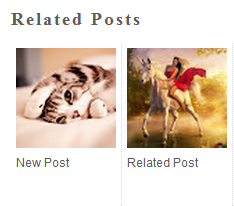
Now here is a wonderful hack for displaying related posts beneath each of your blog posts along with post thumbnails. The related posts are picked from other posts having same category/label/tag. With this hack many of your readers will remain on your site for longer periods of time when they see related posts of interest.
Step 2. Click anywhere inside the code area and press the CTRL + F keys:
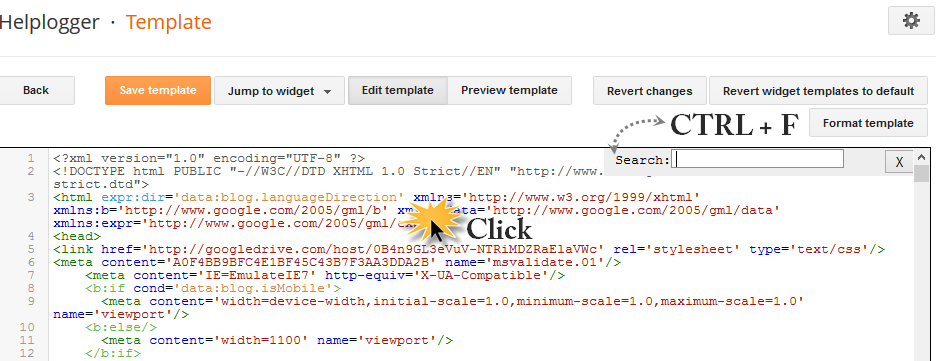
Step 3. Search for this tag that you need to add inside the search box (hit Enter to find it):
Note:
- to change the width and height of thumbnails, modify the 110px and 100px values in red
- to change the color and size of related posts titles, change the #333 color value in blue
- remove the line in violet if you want the related posts to be displayed both in homepage and post pages.
Step 5. Find the line below (you will find two times, but you need to stop at the second one):
- change the 5 value from max-results=5 with the number of posts you want to be displayed
- if you want the related posts to be displayed on homepage too, then remove the b:if lines in violet
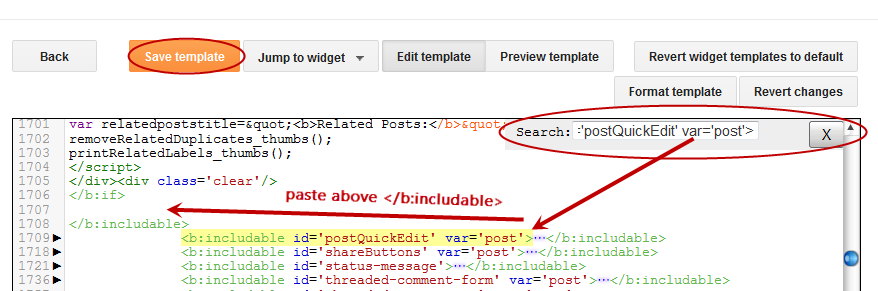
Update! If you are unable to see the related posts widget after saving the template, add the code (step 5) just above the </b:includable> tag that you can find above this line:
Step 7. Save the Template and that's it. Now the Related Posts widget with Thumbnails should appear below each Blogger post that has labels on it. Enjoy!
Adding the Related Posts Widget to Blogger/Blogspot
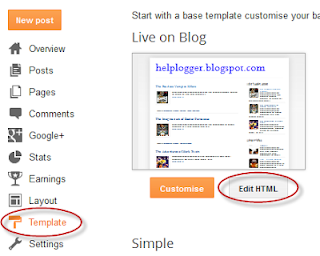
Step 1. Log in to your Blogger account and go to Template > Edit HTMLStep 2. Click anywhere inside the code area and press the CTRL + F keys:
Step 3. Search for this tag that you need to add inside the search box (hit Enter to find it):
</head>Step 4. Copy and paste the below code just before/above the </head> tag:
<!--Related Posts with thumbnails Scripts and Styles Start-->
<b:if cond='data:blog.pageType == "item"'>
<style type='text/css'>
#related-posts{float:left;width:auto;}
#related-posts a{border-right: 1px dotted #eaeaea;}
#related-posts h4{margin-top: 10px;background:none;font:18px Oswald;padding:3px;color:#999999; text-transform:uppercase;}
#related-posts .related_img {margin:5px;border:2px solid #f2f2f2;object-fit: cover;width:110px;height:100px;-webkit-border-radius: 5px;-moz-border-radius: 5px; border-radius: 5px; }
#related-title {color:#333;text-align:center;text-transform:capitalize;padding: 0px 5px 10px;font-size:12px;width:110px; height: 40px;}
</style>
<script type='text/javascript'>
//<![CDATA[
var relatedTitles=new Array();var relatedTitlesNum=0;var relatedUrls=new Array();var thumburl=new Array();function related_results_labels_thumbs(json){for(var i=0;i<json.feed.entry.length;i++){var entry=json.feed.entry[i];relatedTitles[relatedTitlesNum]=entry.title.$t;try{thumburl[relatedTitlesNum]=entry.gform_foot.url}catch(error){s=entry.content.$t;a=s.indexOf("<img");b=s.indexOf("src=\"",a);c=s.indexOf("\"",b+5);d=s.substr(b+5,c-b-5);if((a!=-1)&&(b!=-1)&&(c!=-1)&&(d!="")){thumburl[relatedTitlesNum]=d}else thumburl[relatedTitlesNum]='https://blogger.googleusercontent.com/img/b/R29vZ2xl/AVvXsEgAepghrb6cTcVP8Siz-M4A7SqMMwfh7WBuymkuLwkel0RjB4uuoEPGmnk8u6QJep9O9gCEQtGv3aqgzRNRtCuq_2ywwBg1rILq9d2Q3S0uPGPaaY1IuUKFwLTugFtL7Zblw9LABnvdiA2_/s1600/no-thumbnail.png'}if(relatedTitles[relatedTitlesNum].length>35)relatedTitles[relatedTitlesNum]=relatedTitles[relatedTitlesNum].substring(0,35)+"...";for(var k=0;k<entry.link.length;k++){if(entry.link[k].rel=='alternate'){relatedUrls[relatedTitlesNum]=entry.link[k].href;relatedTitlesNum++}}}}function removeRelatedDuplicates_thumbs(){var tmp=new Array(0);var tmp2=new Array(0);var tmp3=new Array(0);for(var i=0;i<relatedUrls.length;i++){if(!contains_thumbs(tmp,relatedUrls[i])){tmp.length+=1;tmp[tmp.length-1]=relatedUrls[i];tmp2.length+=1;tmp3.length+=1;tmp2[tmp2.length-1]=relatedTitles[i];tmp3[tmp3.length-1]=thumburl[i]}}relatedTitles=tmp2;relatedUrls=tmp;thumburl=tmp3}function contains_thumbs(a,e){for(var j=0;j<a.length;j++)if(a[j]==e)return true;return false}function printRelatedLabels_thumbs(){for(var i=0;i<relatedUrls.length;i++){if((relatedUrls[i]==currentposturl)||(!(relatedTitles[i]))){relatedUrls.splice(i,1);relatedTitles.splice(i,1);thumburl.splice(i,1);i--}}var r=Math.floor((relatedTitles.length-1)*Math.random());var i=0;if(relatedTitles.length>0)document.write('<h4>'+relatedpoststitle+'</h4>');document.write('<div style="clear: both;"/>');while(i<relatedTitles.length&&i<20&&i<maxresults){document.write('<a style="text-decoration:none;margin:0 4px 10px 0;float:left;');if(i!=0)document.write('"');else document.write('"');document.write(' href="'+relatedUrls[r]+'"><img class="related_img" src="'+thumburl[r]+'"/><br/><div id="related-title">'+relatedTitles[r]+'</div></a>');if(r<relatedTitles.length-1){r++}else{r=0}i++}document.write('</div>');relatedUrls.splice(0,relatedUrls.length);thumburl.splice(0,thumburl.length);relatedTitles.splice(0,relatedTitles.length)}
//]]>
</script>
</b:if>
<!--Related Posts with thumbnails Scripts and Styles End-->
Note:
- to change the width and height of thumbnails, modify the 110px and 100px values in red
- to change the color and size of related posts titles, change the #333 color value in blue
- remove the line in violet if you want the related posts to be displayed both in homepage and post pages.
Step 5. Find the line below (you will find two times, but you need to stop at the second one):
<div class='post-footer'>Step 6. Just above <div class='post-footer'> paste this code:
<!-- Related Posts with Thumbnails Code Start-->Note:
<b:if cond='data:blog.pageType == "item"'>
<div id='related-posts'>
<b:loop values='data:post.labels' var='label'>
<b:if cond='data:label.isLast != "true"'>
</b:if>
<script expr:src='"/feeds/posts/default/-/" + data:label.name + "?alt=json-in-script&callback=related_results_labels_thumbs&max-results=5"' type='text/javascript'/></b:loop>
<script type='text/javascript'>
var currentposturl="<data:post.url/>";
var maxresults=5;
var relatedpoststitle="<b>Related Posts:</b>";
removeRelatedDuplicates_thumbs();
printRelatedLabels_thumbs();
</script>
</div><div class='clear'/><div style="font-size: 9px;float: right; margin: 5px;"><a style="font-size: 9px; text-decoration: none;" href="http://helplogger.blogspot.com/2012/03/how-to-add-related-posts-widget-to.html" rel="nofollow" >Related Posts Widget</a></div>
</b:if>
<!-- Related Posts with Thumbnails Code End-->
- change the 5 value from max-results=5 with the number of posts you want to be displayed
- if you want the related posts to be displayed on homepage too, then remove the b:if lines in violet
Update! If you are unable to see the related posts widget after saving the template, add the code (step 5) just above the </b:includable> tag that you can find above this line:
<b:includable id='postQuickEdit' var='post'>To get an idea of the exact location, see the screenshot below:
Step 7. Save the Template and that's it. Now the Related Posts widget with Thumbnails should appear below each Blogger post that has labels on it. Enjoy!

thanks very much
ReplyDeleteworked 100%
for the "class='post-footer-line post-footer-line-1'>" line, I have two of those in my code. how do i know which one to put it under?
ReplyDeleteHello there,
DeleteSorry i forgot to mention there are two of them. Add it after the first line. Take care
after or before?
Deletefriend how did you remove the blogger mark 'B' which shown at the tabs of the browsers?
ReplyDeleteHello mash,
DeleteI've added a new tutorial. Read about it here:
How to change Blogger's default favicon
Any One can help me
ReplyDeletethis is my blog http://imgbook.blogspot.com
i have use these codes.it's workin frist two months. but after few months it auto not working. i don't know what is the broblem.
now i am using linkwihing.linkwithing is not good.
please help me
Thank you so much! My blog is looking good now, I had tried some other code, and it just wasn't working.
ReplyDeletehttp://simplybetterhomemaking.blogspot.com
thanks for this... it works for my blog now.
ReplyDeletehttp://xxxmehide.blogspot.com/
But one thing to ask how to add thumbnails when i never putted a picture to a post? any random pic in array?
also when i change the max-results=6.
ReplyDeleteOnly 5 related post thumbnail display what happened? i recheck everything..
I've updated my post: change the "6" value from max-results=6 from step 6 and the one from step 4 too (if you haven't done this already) To change the "no image" picture, replace the url address in blue with the address of your own hosted picture. I hope it helps
DeleteHi admin. can i ask? how to put it on the main page. cause i only see the related post when i open the post. but cant see it on main page. please answer me thank you!
ReplyDeleteHi,
DeleteRemove the fragments of code in violet from the step 6. Thanks for visiting!
Its bad but it doesnt work on my blogs.
ReplyDeleteWorked perfectly. Thanks a lot!!! :)
ReplyDeleteI'm glad it worked :) Thanks for visiting
DeleteHi - thanks for the post. This works, but I had to tweak it slightly to display it on homepage. The violet coloured codes need to be removed from in Step 4 and Step 6 too. I think your instruction isn't clear on that point. But thanks again.
ReplyDeleteYeah, you're right! Now i'm going to update my post. Thanks for telling me XD
DeleteHi, I can't find either of the last codes you mentioned in my blogger blog. www.allgrownup2011.blogspot.com
ReplyDeleteany suggestions??
Hi, add the code from step 6 below/after <data:post.body/>
DeleteI hope this works.
I can't find either two codes on step 6 or code in my blogger html. Please help me.
ReplyDeleteThen search for this one: <data:post.body/> and paste the code after it. Hope it helps
DeleteI couldn't find either of them... Are there any other options?
Deleteexpand your widgets first.........
DeleteMine was NOT working until I expanded my widgets. Thanks Ateeb & Admin!! Looking great now.
Deletebeautyandthebibliophile.blogspot.com
Thanks a lot, works perftcly....! but it is showing in very small size, i want to increase its size, how can i do that ? hope u will help..!
ReplyDeleteSearch in your template for this address: http://helplogger.googlecode.com/svn/trunk/related-posts-with-thumbnails-for-blogger.js
DeleteREPLACE it with this one: http://helplogger.googlecode.com/svn/trunk/related-posts-with-big-thumbnails.js
Hope it works. Thanks for visiting :)
Nice.. Tip.. I like the Big thumbnails better..
DeleteIs there any chance i could also increase the amount of Text displayed under the thumbnail?
Some related posts topics makes no sense when its half.
I can't find step three with the / in my html. will it still work if I put it below the same word without the slash?
ReplyDeleteIt will work but it is recommended to put it before the head closing tag. Better add it after </b:template-skin> instead.
DeleteThank you so much for getting back to me so quickly! I really appreciate it! I found the code and then pasted yours. But now none of the step 5 codes are in my html. weird? is there anything i can do?
DeleteMake sure you have checked the 'Expand Widget Templates' checkbox then press Ctrl+F and enter one of the codes from step 5 in the Find box at the bottom or top of your browser. The codes can be found only when you check that box. Also make sure to backup your old template just in case you make a mistake. I hope this helps. And thanks for visiting :)
DeleteWell done..its good. I have been searching for that..my blog is..
ReplyDeletehttp://mag222.blogspot.com
None of the three lines of code in step five appear in my template. Suggestions?
ReplyDeleteNevermind, I figured it out :)
Deleteit didnt work for me
ReplyDeletethank you very much
ReplyDeleteNot working for me either. Maybe it's conflicting with some other widget/script?
ReplyDeleteNice post. I have added this in my blog. But, I need a help. Is there any way to change the font for 'Related Posts' title?
ReplyDeletehttp://istash.blogspot.com
:( Blogger is giving me an Error code! Can't save the template.
ReplyDeletehey! how can I change the Thumbnails's dimensions? they are to small and also the images appear distorted! :(
ReplyDeletethanks
ReplyDeletethank u so much.
ReplyDeleteIt didn't work for me but this websites link in in the first post on my blog and won't go away :(
ReplyDeleteIs there a way to adjust the width of the padding either side of each thumbnail? I would like to try and create more space in-between each of the posts didplayed.
ReplyDeleteThanks a lot for explanation! Made it yesterday - works fine.
ReplyDeleteBut I have another type of an issue.
My blog: http://kuklikicom.blogspot.be/
It is bi-lingual.
TO make life easy to the readers I preceede the text with a small icon with the corresponding flag.
And the related posts widget picks up often this flag instead of nice pictures in the post.
How to bypass this?
Thanks a lot for any advices.
Kukliki
Solved it using div with hidden image :)
DeleteStart knowing CSS :)
Cheers
Kukliki
hi,
ReplyDeletefirst of all, i must express my thanks to you for sharing this great tips.
it works for my blog, but i'm facing a minor problem here.
I removed the violet code to have the related post appeared on my homepage too, however when I click on the post, the related post doesn't appear. why is it so?
hope you can help me out. because i does not wish to remove all the codes and search for another code from another author to try it out all over again.
thanks
I really want this to work, but I followed all of the instructions exactly and nothing on my blog has changed. What's going on??
ReplyDeleteguddd!!
ReplyDeletenot workinggg 4r me :((((
ReplyDeleteHey my blog is http://marissapink.blogspot.com/
ReplyDeleteI tried this but it didn't work for me =(
Many apologies for my long missing, i've been a little busy in the last time! Thanks everybody for the feedback!
ReplyDelete@ Atlas: make sure you don't have 2 similar codes like the one from step 4
@ Blogging Sentral: Just add the code from step 6 after: <div class='post-footer-line post-footer-line-1'>
@ Birgit Kerr: Try adding the codes again and pay attention at the code from step 6, it should be pasted after <div class='post-footer-line post-footer-line-1'>
@ Shakhawat Shahed: yes, you could easily change it by increasing/decreasing the bolded value from: #related-posts h2{
font-size: 1.6em;
@ threesugars-aj: Click on Edit HTML and don't save the changes, then try adding the codes again.
@ Nathalia: please see the 27.a comment
@ Tess Delaune: add the bolded lines to #related-posts a{:
#related-posts a{
color:black;
margin-left: 5px;
margin-right: 5px
}
... and increase the 5 value for wider space
@ Pacco - I tested on my blog and it shows both on homepage and post pages. Maybe adding it again would solve the issue.
Thanks for your valuable post
Deletehttp://itunerbd.blogspot.com/
It looks great in my blog buddy,thank you very much for share this useful tips article!
ReplyDeleteNice to read your entire articles,
http://www.advantoday.com/
Thank you, thank you, thank you! :)
ReplyDeleteWorks like a charm. Thank you.
ReplyDeletevery useful tutorial. thank you very much.
ReplyDeleteChange the background-color:#d4eaf2; from the code from step 4 to background-color: transparent;.
ReplyDeleteIts work for me. Thank you. www.weteca.com
ReplyDeletenice work..thanku
ReplyDeletewhat if we can't find the "post-footer-line post-footer-line-1" (all 3 options)?
ReplyDeleteAdd it above <div class='post-footer'> instead.
DeleteIts Not Working On My Blog.
ReplyDeletePls Tell Me
My Blog:- http://yourgenunepc.blogspot.in
thanks for writing this up and keeping up with comments. What edits would I make if I didn't want any image pic- just the text of related post titles?
ReplyDeleteHi,
DeletePlease read this tutorial:
Simple Related Posts
Thanks for visiting!
i can't find this all, please help.. "< class='post-footer-line post-footer-line-1'>"
ReplyDelete"< class='post-footer-line post-footer-line-1'>"
"
"
Add it above <div class='post-footer'> instead.
DeleteHope it works
Thanks for the simple related post! Been searching all over the net and found your post.
ReplyDeleteThanks for stopping by ;)
DeleteHoly Smokes! That was easy! (even with a custom template) And sooooo very kewl! I even plopped my own default pic in for posts that don't have any. And it's working perfectly on the home page too!
ReplyDeleteA fabulous addition to my blog - no doubt will greatly improve my page views. Thanks so much!
http://www.travelnlass.com
You're welcome :)
DeleteHow to Add a Background Color For the Whole Widget. By URL
ReplyDeleteYou have to add the following line after #related-posts { (step 4)
Deletebackground-image: url(IMAGE-URL);
why it only show 3 articles for the video tag(one of my tag, youtube vedeo only i have about 10 articles in that tag), and the 3 articles always the same?
ReplyDeletewhy it doesn't show any article for another tag witch don't contain any picture or video(text only)?
this is my website(please check if you need..):http://djhappyhunk.blogspot.ca/
Thanks.
Thanks You Very Much
ReplyDeleteHi, thanks for your article. how to change the thumbnails to a list format with a small thumbnail picture on the left side? Could you please help me with this?
ReplyDeletehttp://waytobliss.blogspot.in/
working perfectly. Thanks
ReplyDeletei have not post footer div class xD
ReplyDeleteHello, I applied this on my Blog - www.sushilkumar.net
ReplyDeleteEvery thing is almost good. But despite removing the code in violet ( in step 4 and 6) to display related posts in homepage too, it's still working on Post Pages only. Pls Help me .I Tried much...
email- sk.dumka@gmail.com
Dosen't work for me.
ReplyDeleteIt works!! Thank you.. And could you please tell me how can I increase the size of the thumbnail as I feel it so small in my blog.
ReplyDeletethank you very much it worked completely fine. but is it possible to change the header "related posts" to something else or at least amend the font? please let me know how! thanks in advance!
ReplyDeleteHai,
ReplyDeleteReally its helped me lot. Thanks for post.
Is there a way I cant change the font of ''related posts''? I want it to be Georgia and not italic... Furthermore, it works perfectly, thanks!
ReplyDeletereally nice and easy tips for beginners ..
ReplyDeleteone more doubt if i want to show related blogs without thumbnail what should i do?.. please reply me
Great! At first I thought it doesn't work. Tried a few times. Check here and check there.. Then Found out I have deleted some code. :)
ReplyDeleteThanks so much.. very helpful..
Me too, didn't work.
ReplyDeleteWhat can I do if i can't find 'post-footer'? Thanks
ReplyDeleteYes.... it's work.... good job, thanks a lot man
ReplyDeleteit worked! thank you (:
ReplyDeleteOMG! thank you for the code
ReplyDeletehow to change words "Related Posts" to another word
ReplyDeleteThanks for the nice widget. It's work for me, and I want to know how to make some changes. I want 4 related post all together, forming a nice square, with no tittles. Is this possible?
ReplyDeleteHi!
ReplyDeleteI just added it to my blog, http://whynot2000.blogspot.com/, but some posts that have pictures show up with the default picture in the related posts.
Thanks for the great resources!
Thanks SO much! Easy and it worked great!!
ReplyDeleteOk, I spoke too soon. It does work. But I only see it under one category.
ReplyDeleteI would greatly appreciate it if you could take a look at my site and tell me what you think. The first post on the page, under category DIY, is working. But if I click on my other posts, say, a Before/After category, nothing shows. And I do have several Before/After posts so they should be there. I'm lost.
Thanks so much!
Is it possible to use this code in a static page?
ReplyDeleteGetting error:
ReplyDeleteError interpreting blog template
Invalid data reference post.isFirstPost: No dictionary named: 'post' in: ['blog', 'skin', 'view']
thank you,it works!
ReplyDeletehow can i add this widget below comment box?
ReplyDeleteAbsolutely fantastic tutorial mate. This worked without any hiccups, thanks a load!
ReplyDeleteNice brother great blooging
ReplyDeleteThanks :)
ReplyDeleteThank you so much for this tutorial. I've removed my linkwithin and replaced it with your code! Love it!
ReplyDeleteGreat! i succses in the end!
ReplyDeleteHow can I center the thumbnails and posts? I was able to center the "related posts" text but not the boxes underneath. Thanks
ReplyDeletethank you! works great!
ReplyDeletegreat work ! thanks
ReplyDeleteThanks its working ::)
ReplyDeleteThis is awesome! Thank you so much! I am not sure why some posts are getting 2 related posts and some are getting six, though. There are posts that only have 2 but there are more of my posts that are tagged that should appear as well... Please let me know if you have a chance. Thank you!
ReplyDeleteHello, it works on me too... Thank you :) The post title it displays is only 32 characters, I want to change it to at least 60 characters, is this possible, if so how? More power to you and happy blogging!
ReplyDeleteIt doesn't show on my blog. Will it take a few hours?
ReplyDeleteNo, it starts showing in seconds. Do u have labels in ur post as the logic of this script works on labels.
DeleteThank you so much!!!
ReplyDeleteLink Within didn't work and I'm so glad I found your site!
Now this code is on a german food blog :-)
Works great! Can I exclude labels?
ReplyDeleteExample: I have a book blog and I only want to be displayed related posts of the same author, not for the same rating of e.g. 5 stars.
Its not working on me.....!
ReplyDeleteThank you so much, it worked perfectly!
ReplyDelete1 question: how can I make the font of "related posts" smaller"?
Just read through your comments and got my answer. Thank you!!!
ReplyDeleteGreat hack and tutorial.
ReplyDeleteReally easy to follow. Got it up and running in a minute or two.
Thanks for sharing.
so when I copy and past the codes and it hit save it wont save. Is there something i am doing wrong?
ReplyDeleteThank you! Worked like a charm!
ReplyDeleteWorking fine...but it shows the same post also within the list....suppose i have posts 1,2,3,4,5,6 and I am now seeing post 1...so the related posts list should show 2,3,4,5,6...but it's showing the post 1 also within the list...it must not show the current post or the post which is watched currently na...related post for post 1 should be different from post 1...should not include post 1 within the list...
ReplyDeleteThanks for the great post this has to be the best explained one i have found but like all the others ive tried I cant seem to get anything to show up, im using bloggers picture window template and I have follow the instructions word for word, am I missing something?
ReplyDeleteTotally awsome. Wonderful plugin. Thank you very much.
ReplyDeleteThank you so much! This is perfect. :D
ReplyDeleteHi! It works well! But can I change the "related posts" text? I want to translate into my language. :)
ReplyDeleteawesome... it works! Thanks for sharing.
ReplyDeleteExellent job. Very nice modification. Thank you very much. Good looking blog by the way.
ReplyDeleteMay I ask where you get the Recent Comment plugin on your blog?
did not work for me :(
ReplyDeletethanks so much.This is exactly what i am looking for
ReplyDeleteThanks a loit bro
Works great ... thanks!
ReplyDeleteYou are amazing! Thank you so much!
ReplyDeletehey admin, its nice, i was searching this frm long tym, now i want to replace '' related post'' with 'my own words, plz help
ReplyDeleteWorks!! But is there a way to display it BELOW the comments box? I tried moving the code around a bit but the lovely new goody disappeared completely instead of appearing farther down ...
ReplyDeleteI figured out how to move it down!! Find:
ReplyDeleteand paste the SECOND block of code immediately above this. Now the related posts will appear between the share buttons and the comments box.
it is not working
ReplyDeleteIts working, what you need to do is labeling your post with same label name, like i'm doing to my site: http://how-to-grow-taller-naturally.blogspot.com/
DeleteThanks Admin.
why it only show 1 article although it sets to 5
ReplyDeleteHey.. any idea if i want to show this in my sidebar???
ReplyDeletei tried pasting the code just above the div id='rsidebar' but gives me an error.
Hi Saif,
ReplyDeletePlease send me a copy of your template at helplogger76@gmail.com
why the images are fainting?
ReplyDeleteWorked like a charm - thank so much!
ReplyDeleteLinda
www.nightowlcorner.com
I did everything as instructed but it is not showing on my blog. What do I do.
ReplyDeletethank you
ReplyDeletethanks man u r awesome , i like u , be my bf
ReplyDeleteThis is not working. there are two 'div class='post-footer' And am i suppose to put my url in twice?
ReplyDeleteHello dear
ReplyDeleteits works but Default image location is not working on my site. Anyway I dont want to show thumble Image Just related posts only. Can you help me please?
THANK YOU FOR SHARING, I THINK WE SHOULD KISS 'LINKWITHIN' WIDGET GOODBYE..
ReplyDeleteIt doesn't show on my blog.. :(
ReplyDeleteThank you so much was very helpful.
ReplyDeleteGreat post. I was looking that widget for a long time.. Thank you.!
ReplyDeleteYou're welcome. Thanks for visiting :)
Deletethanks very much
ReplyDeletedidn't work for me...is it because m using third party template? or can u guess any possible reason.. Thanks
ReplyDeleteHi Sushmita,
DeletePlease try adding the code from step 6 just below the 2nd <data:post.body/> (instead of <div class='post-footer'>)
I hope this will work ;)
its not working for me
ReplyDeletecheck out my blog
http://companysb.blogspot.com/
Hey until today this worked fine on my blog but now it's not showing anymore? =/
ReplyDeleteIt seems that the recent changes of Blogger's template editor, brought also some small changes in the template's code... Maybe adding it below the 2nd <data:post.body/> (instead of <div class='post-footer'>) would solve the problem?
DeleteYeah that worked! Thanks. =D
DeleteHey Admin, I Really like your templete it's cool and very simple to use as well as it looks professional, I've been looking for a good templete since 2 years but i could not find any good one but when i come to know about your beautiful blog i've learnt many things thank you so much.
ReplyDeleteAdmin this is my blog could you please tell me something about your templete where can i download it. this is my blog freefiles5.blogspot.com
Thanx. plz.
This code works, but my thumbnails are mishapen. it forces the default photo to be a square thumbnail but the photo is often not square which leaves the the photo looking odd. can i change that?
ReplyDeleteHi...
ReplyDeleteThanks for sharing such a nice trick to use related post in blogger.
Hi, thanks for this hack, it is working great. My only problem is that it keeps putting in the current post that I am on (clearly related, haha). Is there a way to fix this?
ReplyDeleteAlso, I already have the "larger" thumbnails, but I use really large ones on my blog. Is it possible to override the size somewhere in the code?
Thank you!
thanks bro
ReplyDeleteHmm. donno the prob. did not worked for me. nothing happent. :(
ReplyDeletethis widget is a good one.
ReplyDeleteby the way, this script is like your related post ?
ReplyDeletei need a related post like you, simple and great
hello admin,
ReplyDeletethis is not working in my blog. Can you help me ?
hi admin.for my blog it's not working. my blog contains a jquery plugin for image slider.is this the reason of not working?pls help.i need your code to work.pls help as soon as possible.
ReplyDeletemy blog- renewpowerzone.blogspot.in
After adding it in my blog, a space was created under the first post in the homepage
ReplyDeleteHow can i remove that space?
Thanks man
I cannot see it on my blog either....hmm...
ReplyDeleteHi, I need your help. I've tried some related posts tutorial for my blog but they didn't work. There was always shown the error 'undefined'. In fact, I've added and activated labels in my blog. Any solution for this ? Thanks
ReplyDeleteHello Admin I am using Hi-Tech Template of templateism and I tried To Add Related Posts Widget To My website www.technologyraise.com but its not working .I followed each step .Please help me out.
ReplyDeleteThanks for such a nice tutorial. But may I know how to:
ReplyDelete1. Change the thumbnail to a higher resolution? (It is so blurry with normal computer screen and even more blurry with MacBook Pro's Retina Display)
2. Change the font-size inside? It is currently 12px but I wanted to change it to 10px.
Thanks!!!!
You rock! Please start a newletter and email me when you do!! tinigenie@gmail.com! Can I add this blog to my faves on my website? Take a look and see what you think, we are just getting started , so please go ease! theurbanbreeze.blogspot.com
ReplyDeleteHow can I adjust size of my related post to Be 6 in one line or twelve in two line in stead of 4 in one line, or 8 in two line?
ReplyDeleteThanks man, it's awesome
ReplyDeletethere is no expand widget also <div class='pos.....not found help
ReplyDeleteGreat work. :D
ReplyDeleteWorked for me just fine.
Hi, new to HTML, when I click "edit HTML", there is no "expand widget template" box. Exactly where is that located? Thanks!
ReplyDeletethank you, it worked.
ReplyDeleteIt doesn't work on my blog at all. :( so bummed. Also I have post footer line 1 and 2, I added post code under line1 . Please help. Linkwithin is useles for my blog. :(
ReplyDeletewww.shoppingstylenus.com
I didn't work. Any ideas why?
ReplyDeletethank you bro
ReplyDeletehi there.............
ReplyDeleteDear sir I want you to have a look at my blog because I have a problem with it. The post are not properly visible some of text in the end is not properly displayed.. As I am not that much of professional to sort it out I hope you can definitely help me out.
Thank you so much! It looks great. I had to read the comments and see that I needed to put the second snippet of code below the first footer tag- it didn't work until I did that. But now it looks GREAT!! Thank you so much for your time!
ReplyDeleteNice.. Tip.. I like the Big thumbnails better..
ReplyDeleteIs there any chance i could also increase the amount of Text displayed under the thumbnail?
http://maghrb.com/
Some related posts topics makes no sense when its half.
its nt showing on my blog pls help.... yemiolaniyan.blogspot.com
ReplyDeletemine doesn't work.. nothing change..=(
ReplyDeleteHello, thanks for your instructions, I've put your codes on my blog, it works properly, but I would like to change it minimal, could you help me?
ReplyDelete1. I would like to put the widget in the middle after end of posts. After writing commend
#related-posts{float:center;width:auto;}
nothing's changing.
2. I would like to change the adjustment of pictures to the frame - I would like to have cutted photos in squares, now photos are fitted to squares and one of them are stretched which doesn't look pretty.
3. I would like to have 7 or 8 photos, but the maximum I have is 4. What should I do?
Thanks for helping, Alice.
here is my blog http://konturek.blogspot.com/
Hi Ala,
Delete1. You need to add the margin-left property instead of float: center (you can't center elements by using float):
#related-posts{margin-left: 200px;}
Where 200px is the distance from the left. Change this value to move it more on the left/right.
2. I'm sorry but I don't know any solution for this using CSS, it would require using jQuery and it's a bit more complicated to explain here. Maybe I'll make a tutorial about it soon.
3. Have you tried to change the two "5" values from max-results=5 (step 6)?
thanks!! that's great, i will put it in my blog http://qneblog.blogspot.com
ReplyDeletethanks!!
Thank you for this post it helped me a lot
ReplyDeletehttp://softwareofnet.blogspot.com/
This is great. Thanks a ton! Very well explained. I appreciate you taking the time!
ReplyDeletethanks bro for sharing this useful post. Can you suggest me how to show full post title.
ReplyDeleteI added this, but it's not proper working.. http://www.noorani-islam.blogspot.com
ReplyDeleteI did as you instructed but it's not working for me :(
ReplyDeleteI did as instructed and it works Thanks a ton !
ReplyDeleteAmazing! Thank you so much!!
ReplyDelete