Here's a really easy trick that will make a Blogger image show only in homepage and hide it in Blogger posts. In order to make images appear only on homepage, we need to add a simple CSS code snippet in the template and then use the hidepic class each time we want to hide an image.
 Step 1. First, log into your Blogger account and click on your blog. Then go to "Template" and press the "Edit HTML" button.

Step 2. Click anywhere inside the code area and press the CTRL + F keys to open the search box:
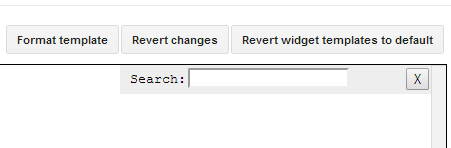
Step 3. Type or paste the following tag inside the search box and hit Enter to find it:
Step 4. Once you found the tag, paste the following CSS code just BELOW it.
Note: the html code should be on the exact location where your image has been placed. For instance, if the image is in the middle of the content, then the code should be found in the middle of the text code. This might be a bit tricky at first, but we can use CTRL + F to search for that specific area.
Also, please make sure that you are in the "Compose" tab when uploading your images, otherwise the image code will omit the div containing the "separator" class.
Step 6. Replace the separator CSS class with hidepic - see the screenshot below for more info:

Once you replaced it, click the "Publish" or "Update" button.
So this is how we can easily show Blogger image only on homepage and hide it in post pages. Enjoy!
Hide Image in Blogger Post and Show it Only on Homepage
Step 2. Click anywhere inside the code area and press the CTRL + F keys to open the search box:
Step 3. Type or paste the following tag inside the search box and hit Enter to find it:
]]></b:skin>
Step 4. Once you found the tag, paste the following CSS code just BELOW it.
<b:if cond='data:blog.pageType != "index"'>Step 5. Now that we added the CSS code to hide (display:none;) the images with hidepic class, click the "Save Template" button to save the code.
<style>.hidepic{display: none;}</style>
</b:if>
How it works?
Each time you create a post and need to hide a specific picture, switch to the HTML tab to see the HTML code of the image, which will look something like this:<div class="separator" style="clear: both; text-align: center;">
<a href="https://blogger.googleusercontent.com/img/b/R29vZ2xl/AVvXsEhAfluKsQRlFQ4PK-tDUBIl1iW4cCijRjLfa77atGKUjfk10rhJk_vTwd0ZGqfSrXtLdlgXUMG2_olFW_JZTZuRzQzKldl8_5YXg8JW2lR74gB582bVEcz6smXdiurnnuINDVniPtGPixw/s1600/fire_bird_by_fhrankee-d32af8v.png" imageanchor="1" style="margin-left: 1em; margin-right: 1em;"><img border="0" height="320" src="https://blogger.googleusercontent.com/img/b/R29vZ2xl/AVvXsEhAfluKsQRlFQ4PK-tDUBIl1iW4cCijRjLfa77atGKUjfk10rhJk_vTwd0ZGqfSrXtLdlgXUMG2_olFW_JZTZuRzQzKldl8_5YXg8JW2lR74gB582bVEcz6smXdiurnnuINDVniPtGPixw/s320/fire_bird_by_fhrankee-d32af8v.png" width="320" /></a></div>
Note: the html code should be on the exact location where your image has been placed. For instance, if the image is in the middle of the content, then the code should be found in the middle of the text code. This might be a bit tricky at first, but we can use CTRL + F to search for that specific area.
Also, please make sure that you are in the "Compose" tab when uploading your images, otherwise the image code will omit the div containing the "separator" class.
Step 6. Replace the separator CSS class with hidepic - see the screenshot below for more info:
Once you replaced it, click the "Publish" or "Update" button.
So this is how we can easily show Blogger image only on homepage and hide it in post pages. Enjoy!

Very good! thank you for this tutorial!
ReplyDeleteSo, here as you used first pic to show on your homepage and that pic is not shown here on post page! wao! thanks
What if i want to show images both on post and homepage
ReplyDeleteOh dude! just ignore the code, don't implement it and you'll get it.. :P
DeleteBy default image is shown on both, homepage and post page
Deletethanks
ReplyDeleteI am searching a lot about this. Thanks a lot for this tips it help me a lot.
ReplyDeletehi author, any idea how to hide the description on the homepage but show on post pages? Without using js if possible...thanks!
ReplyDeleteWhat if i don't have this line in my template?
ReplyDeleteThanks, but i need help on how to hide the title and description of my blogger blog to the site visitors, and make them visible to search engines only.
ReplyDeleteThis tutorial is what I want to know in the past few weeks. Thanks bro!
ReplyDeletehow can i also hide the header for a widget? i tried .hidepic > h2 and .hidepic h2 neither will work.. is it something with the code that only hides the div?
ReplyDeleteIs there a way to hide a standalone pic on the post page? Right now I have a main pic at top of website that stays no matter what story is clicked on. Would be helpful if anyone knew how to hide it on a post page but to stay on home page. Thanks.
ReplyDeleteGood info! Works for me. Thanks.
ReplyDeletesuper....!
ReplyDeleteAwsomeeeeeeeeeeeeee :)
ReplyDeletecsworldx.blogspot.com
my template HTML don't have }]]> code have only . how can i do? do you have any way?
ReplyDeleteSearch for ]]></b:skin> only (without the curly bracket).
DeleteWhen I search ]]> it doesnt find anything? :(
ReplyDeletePlease make sure that there isn't any blank space before/after it.
Deletehello, how can i hide in in mobile to??
ReplyDeletevery helpful post thanks
ReplyDeleteGOD Bless
ReplyDeleteThanks Team
Nice tutorial. But what I need is 'how to hide images from homepage but not from post'. Opposite of this tutorial actually. Thanks in advance
ReplyDeleteNice. But how about doing reverse, hide the image in main and make it appear in post page
ReplyDelete