We have already posted a tutorial on how to add a simple recent posts widget that shows a list with the most recent posts if you'd prefer a more minimalist look. This tutorial will show you a different way of displaying the Recent Posts on Blogger. This is specially for users who want to show more info like recent posts excerpt or summary and the posts thumbnails.
To add the Recent Posts widget with thumbnails in Blogger is very easy. Just follow these steps below:

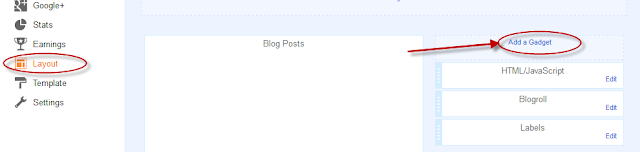
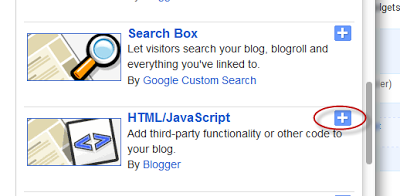
Step 2. Once the pop-up window appears, scroll down and choose HTML/JavaScript
Step 3. Inside the empty box, add the following code:
- to disable the scroll bar, remove the 500 value
- by default, this widget is set to display a maximum of 8 recent posts. To change this number, replace 8 with the number of posts that you want to show
- to display only the post titles, change true to none and "0" from padding-top:0px with 10
Step 4. Save your widget. And you're done!
To add the Recent Posts widget with thumbnails in Blogger is very easy. Just follow these steps below:
How to Add the Recent Posts Widget to Blogger
Step 1. From your Blogger Dashboard, go to Layout > click on Add a Gadget linkStep 2. Once the pop-up window appears, scroll down and choose HTML/JavaScript
Step 3. Inside the empty box, add the following code:
<div class="eggTray">
<script src="https://googledrive.com/host/0B4n9GL3eVuV-bFc4a1RjZ2Zhbjg">{"pipe_id":"1a6640e2a78b2c6e736f2220529daae5","_btype":"list",
"pipe_params":{"URL":"YOUR-BLOG/feeds/posts/default"},
"hideHeader":"false","height":"500","count": 8 }</script>
<noscript>Your browser does not support JavaScript!</noscript></div>
<style type=text/css>
.eggTray {margin:10px 0px;padding:0px;}
.ybr li {border-bottom:0px #cccccc dotted; padding:0px 0px 10px 0px!important;}
.pipesTitle {padding-top:0px;}
.pipesDescription {display:true;}
.ycdr, .ycdr a {color:#999999;}
.widget .popular-posts ul {padding-left:0;}
</style>
Recent Posts widget settings
- replace YOUR-BLOG with the url of your site or blog (ex: http://helplogger.blogspot.com) and look to have just one forward slash symbol "/" at the end of the url otherwise will not work- to disable the scroll bar, remove the 500 value
- by default, this widget is set to display a maximum of 8 recent posts. To change this number, replace 8 with the number of posts that you want to show
- to display only the post titles, change true to none and "0" from padding-top:0px with 10
Step 4. Save your widget. And you're done!

How to decrease the Thumbnails size???
ReplyDeletenice i get it cool
ReplyDeleteVery Awesome
ReplyDeleteThanks very much :)
ReplyDeletehi. i was able to make the widget appear however the thumbnails are blank. what to do please? thanks...
ReplyDeleteSame Here.... Thumbnails not appearing
ReplyDeleteThanks very much :)
ReplyDeleteHello, I tried all what you said but it can't show me anything :(
ReplyDeletehere is my blog pliztellme.com
It worked magic in my blog...thank u for the great tool, ure the best!
ReplyDeletenice post I had added this to my blogger.
ReplyDeletehi, how to make it horizontal instead of vertical recent post? thanks..
ReplyDeleteI wannt know the horizontal feature too.
Deletethanks..nice blog
ReplyDeleteI don't see any thumbnails?
ReplyDeletegood
ReplyDeleteThanks this works great - much appreciated
ReplyDeleteHow to change thumbnail size and summary length?
ReplyDeleteHello, I followed the instructions and everything correctly, but I have a problem.
ReplyDeleteThe recent posts appeared, but they do not have images(thumbnail), although my original posts have images inside of them.
this is my blog: http://mylast4.blogspot.com/
Please I need help ;)
Thank You
wow.. greatest share.........
ReplyDeleteits blank, why no thumbnail? :'(
ReplyDeleteGreat tool. Thank you!
ReplyDeleteThanks bro it is handsome i like it
ReplyDeleteThat's good brother, such a nice post. But, as others complained, how to manage the sumary, thumbnail, title, and even the arrangement? What if i want to show the sumary above the image and title?
ReplyDeleteI've published an article due to this matter, maybe some of those who posted the comments above gonna love it. Check it here if you'd like: Recent Post Thumbnail For Blogger.
Nice to find this blog anyway. Realy a good blog admin, and i love it. :)
Nice post great man. I made this a few times ago, but no more. Now i use the automic widget for it. Just click and done.
ReplyDeleteSorry for the spam comment a few weeks ago. :)
Maybe this could help. Thanks!
ReplyDeleteBrilliant widget! Thank you! Do you know if there is any way I can change the font colour of the title of each post listed? Also is there a way of selecting different posts to display.
ReplyDeleteTHANK YOU!!!!!
info@sardiniababy.com
Thanks- got it installed, but for some reason the most recent post (first one on list) does not have the text description.
ReplyDeleteNice efforts here! :)
Its really very nice post
ReplyDeletevery cool. thanks.
ReplyDeleteThanks! This was the one I was really looking for. Works perfectly at my blog.
ReplyDeleteYour site is wonderful. I’m so satisfied to have discovered you.I appreciate to this one.
ReplyDeleteKeeps coming back with "No Results"
ReplyDeleteThanks! Its really very nice post
ReplyDeleteThanx a lot for this widget..though the thumbnails of the Posts are not appearing in my blog..see it at..
ReplyDeletehttp://cosmologistic.blogspot.in/
cool
ReplyDeletethank you very very much....
ReplyDeleteThanks, i will try it in my blog.
ReplyDeleteHow do I post an HTML link to the comments sections of someone else blog on blogger (blog spot)?
ReplyDeleteI keep trying post a hot link to another page and when its published in the comments section - it just shows the code I pasted. I know its possible as everyone else on these comments posts links.
THANKS
Its wouldn't be better then this because its truly an informative post. Thanks for the great work and keep going!!!
ReplyDeletetwo questions:
ReplyDelete- how do I "un-bold" the post title font for my recent x?
- Can I tell the widget to list posts so that the oldest ones show first?
Great widget btw. I really like it
If anyone wants to see what it looks like you can go here for a visual:
whisperingbird.blogspot.com
WB
I want my selected posts in thumbnails in the sidebar, how can I do that?
ReplyDeletethank you!!! It worked fine with me!!!!!
ReplyDeleteYou rock ^__^
Thank you so much!!
ReplyDeleteI Did It... and So Can You!
thanks it works great
ReplyDeleteits very heavy to load this script..
ReplyDeletethanks sir for this wonderful widget, i have successfully added it to dailyschoolnews
ReplyDeleteis a really nice widget, needs some work....only one thumbnail was displayed :-)
ReplyDeleteI`am looking for tumbnail recent post where the tumbnail goes left to right, is there any?
ReplyDeleteSorry to say but its not working.
ReplyDeleteNice, but why the few of content isn't appear in my blog http://jemick.blogspot.com . Help me please
ReplyDeletethanks for post
ReplyDeleteRecent Posts doesn't appear in That gadget!
ReplyDeleteMy Blog: http://bhejamatpaka.blogspot.in
I'll test it out. Thank you so much.
ReplyDeleteIt is not working anymore ...
ReplyDeleteThanks. I've added it to my blog. Your blog is very resourceful. keep it up
ReplyDeleteIt is not updating the list in my blog! It was working fine! I don't know what happened! My last two article are not showing up!!
ReplyDeleteIs adding this script(to make a list) in blog post is spam?
ReplyDeletethank you so much, bro.
ReplyDeleteu make my blog become greater :D
visit me at vickzkater.blogspot.com
Thanks dre!
ReplyDeleteIs there a way to remove the blogger logo? Also, how to increase the summary length? Thanks
ReplyDeleteThanks a lot
ReplyDeleteIt worked in my blog,thanks a lot for the great tool
ReplyDeleteAlso to remove the scrollbar, change "height":"500" to "height":"auto"
ReplyDeleteOops! What happend.. look at me :D
ReplyDeletei am trying to get this for http://www.naziapakistan.blogspot.com but its show like this Recent Posts Thumbnails Blogger Widget
ReplyDeleteany suggestion pleas
Hey its great.
ReplyDeleteWorking for my nicely!.
Thank you!
Thank you so much. It works
ReplyDeleteThanks very much :)
ReplyDeletehttp://greek-observatory.blogspot.com/
Thank you very much I have installed this widget at http://www.findmesimilar.com/ but how to increase the width of this widget.
ReplyDeleteThanks in advance.
Hi, it looks great but I can only seem to get it to display 20 posts. Ideally I need a widget like this one to display all my posts on a page. Can you help? info@sardiniababy.com
ReplyDeletethats great. this tutorial absolutely working.
ReplyDeletewww.smarsia.blogspot.com
I can't thank you enough for this, it's been so helpful :-)
ReplyDelete-Kirsten
http://lateforteaa.blogspot.co.uk/
Good work brother now i use this many thanks look!
ReplyDeletehttp://all-with-all.blogspot.com/
Thank you- very cool- I appreciate the customization options!
ReplyDeleteIs there a way to remove the blogger logo and unbold the post titles?
ReplyDeleteHow i can do? if i don't need picture thumbnails.
ReplyDeleteI've remove the 500, why it's still using scroll ?
ReplyDeleteVery useful… now i am understand how to optimize my blog. thanks..
ReplyDeletesame here
ReplyDeletetarget='_blank' for post title.
ReplyDeleteThis post makes my day. I'm going to implement it as soon as I get home. I'm sure that this widget will retain some visitors. Thanks a lot. Already subscribe to your blog and will be back to more useful post.
ReplyDeletethis was working great.. it has stopped working for some reason? http://sportsbrothersfam.blogspot.com/
ReplyDeleteworking now..
ReplyDeletethanks for tuto.
ReplyDeleteThanks you for this widget, but how can I remove the thumbnails? They're too big.
ReplyDeletethanx for writing the post.
ReplyDeleteI've just tried it but the thumbnail 'n excerpts don't appear. what should I do?
My thumbnails are blank.......Please assist me
ReplyDeleteJust what I was looking for.... Thank you.
ReplyDeleteGreat information i like it you are really smart. thank you..
ReplyDeleteI have already installed a recent post with thumbnails on my blog. Now, my blog looks better.
ReplyDeleteThis is really incredible , I Liked it !
ReplyDeleteHey its great.
ReplyDeleteWorking for my nicely!.
Thank you!
love it!
ReplyDeleteHi,
ReplyDeletei really like and love this widget.this is what i looking for but i need some help.
why recent post list only list just 20 post only?
i already adjust the count number more than 50 but still show only 20 post list.
how to modify the code to make it list more than 20 post list?
tq.
this is nice VERY NICE thank you so much...
ReplyDeleteBUT there's a problem. the Title appears as "null" instead of the actual titles from the posts themselves ;[
Help please!!!
Awesome post . i like it
ReplyDeleteThanks this Sharing............
ReplyDeleteIF YOU WANT TO REMOVE THE THUMNAILS:
ReplyDeletePUT THIS .pipesThumbnail {display:none;} JUST BELOW .pipesDescription {display:true;}
YOU CAN SEE EXAMPLE HERE www.nursingclient.com
Hey its great.
ReplyDeleteWorking for my nicely!.
Thank you!
viec lam
hi, how to remove image tunmbail.. i just wanna link only..
ReplyDeleteThank Youuuuuu
ReplyDeletethanks, nice sharing
ReplyDeleteThank you.My blog is http://submitmysites.blogspot.com/ for net solution.But I want to change the thumbnail image size.Please help.
ReplyDeletewow! fantastic widget and great job. it really suited my blog. Thanks a lot!
ReplyDeleteGreat post to share thanks for sharing
ReplyDeleteAnyone know how to decrease the padding between first post and top? Kind of a little large.
ReplyDeleteIs there a way to increase the time it uses to determine "recent"?
ReplyDeletethanksss
ReplyDeleteHow to increase the size?
ReplyDeleteHello Dear,
ReplyDeleteFinally I have been capable to set it to my blog Textile Aid .
Thanks a lot
I want the image to be big and the post title to appear below the image.. ca u say how to do it?
ReplyDeleteThank you soo much :D
ReplyDeleteNice widget
ReplyDeleteGreat widget bro, Is there is anyway to increase loading time of this widget? It only loads after loading all widgets on my site.
ReplyDeleteThanks for such an incredible post in easy language..
ReplyDeleteI like the way you write to touch the readers.. Appreciatable
Please check, I've just added this widget:
http://ethicalsoftwares.blogspot.com
its not working i am confused with padding "0" with 10 i dont understand this
ReplyDeletethanks you
ReplyDeleteThis really helps coz my blogger dashboard don't support recent comments. My blog is www.pinoyscoops.com
ReplyDeleteits working gr8! thank you...www.praveenkanwar.blogspot.com
ReplyDeletethis widget is working smoothly thanks
ReplyDeleteThis really works, it helps a lot. www.pinoyscoops.com
ReplyDeletethis widget is working smoothly thanks http://www.ahmad-web.com
ReplyDeleteThis widget is working smoothly thanks!
ReplyDeletehttp://maciku.blogspot.com
Good job, Thank you very much! But please help me How to change the Thumbnails size???
ReplyDeletehow to change its redirecting url for more view
ReplyDeletehey if your having trouble with thumbnails not coming up in a template you downloaded and uploaded. You have to upload your images to blogger you can't use external link images from other sites. It won't work. If you upload image to blogger and add to post it should auto work the thumbnail.
ReplyDeleteGreat to see this , I ahve applied to my blogs
ReplyDeletemay be thanks to you .
ReplyDeletenice i get it cool!
ReplyDeleteamazing you solve my problem really
ReplyDeleteGreeeeeaaaaaat!!!
ReplyDeleteThank you. I lost this part in my blog; now I was able to restore it.
ReplyDeletethank so much!
ReplyDeletethis widget is working smoothly thanks
ReplyDeleteCan you please to do displaying 100 articles and with title and 3 lines text ???
ReplyDeleteI want for the page here: http://www.osiaefxi.com/
This was working perfectly on my blog, www.diybeautify.com...now however I am getting "No results". Any idea what to do to fix? I uninstalled and added it back but...nothing :( Help please.
ReplyDeleteGreat, this is what i looking for.
ReplyDeleteHi, I think this question has been asked, but I don't see the solution. How do I unbold the font titles? Thanks.
ReplyDelete