The Floating Social Media Sharing is a very popular widget on all the top blogs and this is one of the ways to increase the number of times your posts get shared on Twitter, Facebook and other social networks.
This floating social bar has the following options: Facebook Like, StumbleUpon, Twitter Share, Digg This, Google+ and each of them comes with a live counter. You can add more sharing buttons or social bookmarking icons later if you want.

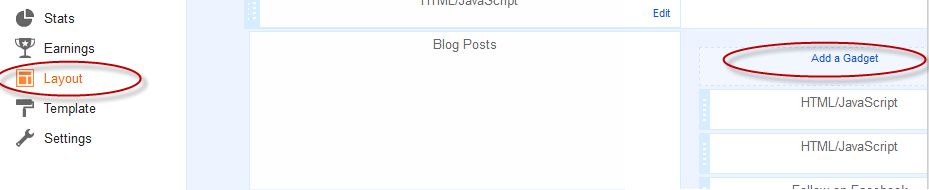
Step 1. Log in to your Blogger Dashboard, select your blog and go to Layout
Step 2. Click on Add A Gadget link
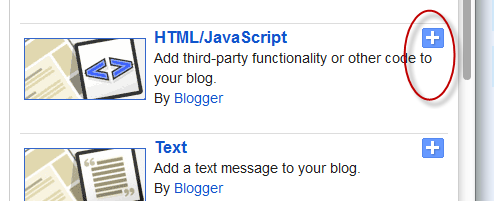
Step 3. From the pop-up window, scroll down and select HTML/Javascript
Step 4. Copy the code below and paste it inside the empty box.
The code to copy-paste (updated!):
This floating social bar has the following options: Facebook Like, StumbleUpon, Twitter Share, Digg This, Google+ and each of them comes with a live counter. You can add more sharing buttons or social bookmarking icons later if you want.

How to add the scrolling social bookmarking bar
Step 1. Log in to your Blogger Dashboard, select your blog and go to Layout
Step 2. Click on Add A Gadget link
Step 3. From the pop-up window, scroll down and select HTML/Javascript
Step 4. Copy the code below and paste it inside the empty box.
The code to copy-paste (updated!):
<style type="text/css">Customization:
#social-buttons {
position:fixed;
bottom:15%;
margin-left:-721px;
float:left;
border-radius:5px;
-moz-border-radius:5px;
-webkit-border-radius:5px;
background-color:#fff;
padding:0 0 2px 0;
z-index:10;
}
#social-buttons .button-share {
float:left;
clear:both;
margin:5px 5px 0 2px;
}
</style>
<div id='social-buttons' title="Get this from helplogger.blogspot.com">
<div class='button-share' id='like' style='margin-left:7px;'>
<div id="fb-root"></div>
<script>(function(d, s, id) {
var js, fjs = d.getElementsByTagName(s)[0];
if (d.getElementById(id)) return;
js = d.createElement(s); js.id = id;
js.src = "//connect.facebook.net/en_US/all.js#xfbml=1";
fjs.parentNode.insertBefore(js, fjs);
}(document, 'script', 'facebook-jssdk'));</script>
<div class="fb-like" data-send="false" data-layout="box_count" data-width="40" data-show-faces="false"></div>
</div>
<br /><div class='sbutton' style="margin-left: 2px;" ><a class='twitter-share-button' data-count='vertical' data-via='Helplogger' expr:data-counturl='data:blog.url' href='http://twitter.com/share' rel='nofollow'>Tweet</a><script src='http://platform.twitter.com/widgets.js'; type='text/javascript'></script>
<br />
<div class='button-share' style="margin-left: 3px;" id='su'>
<script src="http://www.stumbleupon.com/hostedbadge.php?s=5"></script>
</div>
<div class='button-share' id='digg' style='margin-left:3px;width:48px'>
<script src='http://widgets.digg.com/buttons.js' type='text/javascript'></script>
<a class="DiggThisButton DiggMedium"></a>
</div>
<div class='button-share' style='margin-left:3px;' id='gplusone'>
<script type="text/javascript" src="https://apis.google.com/js/plusone.js"></script>
<g:plusone size="tall"></g:plusone>
</div>
<div style="clear: both;font-size: 9px;text-align:center;">Get <a style="color: #3399BB;" href="http://helplogger.blogspot.com/">widget</a></div></div></div>
- Vertical alignment - Change the 15% value of bottom. The code positions the social bar relative to the bottom of your browser window. To fix the distance even when window is resized, specify the value in px (pixels) instead of %.
- Horizontal alignment - Change the -721px value from margin-left. Negative value pushes the button to the left of the main blog column, positive value pushes it to the right. Increase or decrease the value based on your needs.
- Twitter setting - Replace Helplogger with your Twitter username
- Replacing and removing buttons - You can replace existing buttons with your own. Each button is represented by this code:
<div class='sbutton'> BUTTON CODE HERE </div>

Thank you for the helpful post!
ReplyDeleteThank you too :)
DeleteThanks for you post. I have a tutorial that show you how to add Facebook share button. You have just copy and pasting quality. http://www.databaseidea.com/2012/06/how-to-create-facebook-share-button.html
ReplyDeleteI have installed the widget successfully, but the tweet button isn't working. Any ideas?
ReplyDeleteSorry, now i've seen the bug. Try adding the code again, it should work now...
DeleteKindly let us know why the tweet button isn't working.
ReplyDeleteHi Moffat, i've updated my post. Please add the code again.
ReplyDeleteThanks for visiting
i got this aewsome
ReplyDeleteHello-
ReplyDeleteWill you be updating this code to include Pinterest?
It is awsum ,I experienced some bugs but removed later on.
ReplyDeleteNow it is working on my one of bloggers .
Thanks
thanks admin for sharing this gadget for may blog :)
ReplyDeleteHi..
ReplyDeleteThanks for nice tutorial. I am looking for the same to add this on my blog MyComptuerTuts.
Once again thanks a ton!!
admin i wanted to confirm before putting this code in my blog that it will work in dynamic view also?
ReplyDeleteThis is a fantastic post. I am very impressed. It's working perfectly.
ReplyDeleteCan you also check out my blog at www.applehelpp.blogspot.com? I want to confirm if it is being shown to others as well.
I hope it works, I will be subscribing to you soon! Cheers!
Shahmeer
not working on my blog www.taiwopublishing.blogspot.com
ReplyDeletevery good,I got very used ..... thanks for sharing this gadget for blog....
ReplyDeleteLove this! Thanks so much for sharing.
ReplyDeleteThanks for sharing such useful information. The information provided is very very niche and this information is not available so easily. Therefore I thank the writer for the useful input!!
ReplyDeletei don't know what's going on. fb button will be hidden in my post page but seen on homepage. if u can help me. visit my blog :)
ReplyDeleteIt's not working for me after many tries. How do I undo everything I did and saved (as instructed above)?
ReplyDelete(anonymous because it seems only I find it hard to do) :/
Thanks!
ReplyDeleteUsing it now on my blog: http://chemist2writer.blogspot.com/ :)
I need to move it over to the left further. How?
ReplyDelete:) thank you
ReplyDeletenot working on
ReplyDeletewww.laptop-spec.com
i think css i have cs issues
that is external css is interrupting inline css
Dude, you are ROCK !
ReplyDeleteThank you very much for your great methods :)
Like it
www.lulurbandung.com
Indonesia
how to add pinit and linked in to this..please help
ReplyDeleteNice one
ReplyDeleteDigg button counter is not working
ReplyDeleteI think you should now remove those digg and stumbleupon and update it with facebook, twitter and google plus.
ReplyDeleteThis is great, thank you so much. I would like to move it to the right, how would I do that?
ReplyDeleteThanks, It works! :-)
ReplyDeleteTake a look at my blog http://aadhilnet.blogspot.com/
how to put the 1 which you re using.its very nice...
ReplyDeletenice
ReplyDeleteGreat i like this and its put my blog.Thanks admin
ReplyDeleteDoesn't work on dynamic views.
ReplyDeleteThat was cool. Thanks for sharing.
ReplyDeleteIt is not working on my blog
ReplyDeleteplz view my blog and help me finding the flaw
www.Intbook.blogspot.com
i am using dynamic views
I like to replace the Stumble Upon button with Pinterest instead, the link you provided from someone asking the same question on this post leads to a different type on social media sharing design! Just need some codes to replace stumble upon or just add additional codes for Pinterest. Thanks & looking forward to your reply! ;)
ReplyDeletethanks, very helpful
ReplyDeleteSeriously, HOW CAN YOU GET THE CODES, when you have disabled the copy paste option.??
ReplyDeleteThanks, im now using it on my site www.knowils.info, I adjust the margin to fit so it doesn't block my other gadget and my post body.
ReplyDelete