The main advantage on this Recent Posts widget is that it will show not only post titles, but also post excerpts or snippets, and it's easy to customize or apply different style on it. To make it fit your own design, you will need to modify the CSS style - you can change the link or background color, the size and color of text/links.
What you can do with this widget:
- display post titles only
- change the number of posts
- change the number of characters of the post snippet/excerpt
- show the post dates
See the screenshot below:

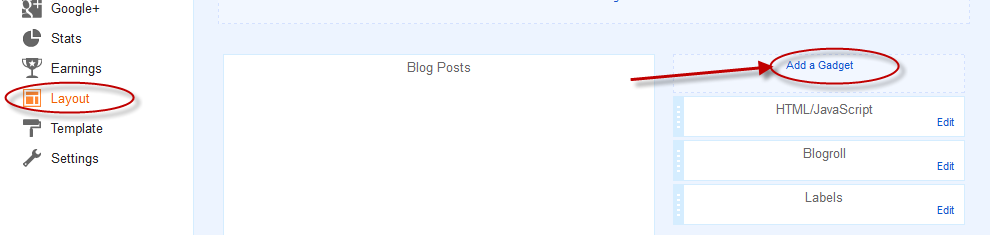
2. From the pop-up window, scroll down and choose HTML/JavaScript from the list...
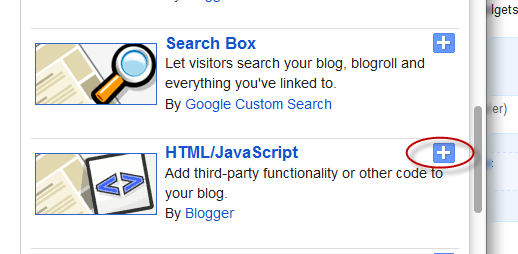
3. Select & copy the code below the chosen widget and paste it into the HTML/JavaScript content box:
What you can do with this widget:
- display post titles only
- change the number of posts
- change the number of characters of the post snippet/excerpt
- show the post dates
See the screenshot below:
How to add Recent Posts Widget to Blogger
1. Log in to your Blogger Dashboard > go to "Layout" and click the "Add a Gadget" link:2. From the pop-up window, scroll down and choose HTML/JavaScript from the list...
3. Select & copy the code below the chosen widget and paste it into the HTML/JavaScript content box:
Recent Posts Widget with Snippets
<div id="hlrpsa">
<script type="text/javascript">
function showrecentposts(t){for(var e=0;e<numposts;e++){var n,r=t.feed.entry[e],i=r.title.$t;if(e==t.feed.entry.length)break;for(var s=0;s<r.link.length;s++)if("alternate"==r.link[s].rel){n=r.link[s].href;break}i=i.link(n);var a="...",d=r.published.$t,u=d.substring(0,4),o=d.substring(5,7),c=d.substring(8,10),l=new Array;if(l[1]="Jan",l[2]="Feb",l[3]="Mar",l[4]="Apr",l[5]="May",l[6]="Jun",l[7]="Jul",l[8]="Aug",l[9]="Sep",l[10]="Oct",l[11]="Nov",l[12]="Dec","content"in r)var m=r.content.$t;else if("summary"in r)var m=r.summary.$t;else var m="";var w=/<\S[^>]*>/g;if(m=m.replace(w,""),document.write('<div class="rctitle">'),standardstyling&&document.write("<br/>"),document.write(i),1==showpostdate&&document.write(" - "+l[parseInt(o,10)]+" "+c+" "+u),document.write('</div><div class="rcsumm">'),1==showpostsummary)if(standardstyling&&document.write(""),m.length<numchars)standardstyling&&document.write("<i>"),document.write(m),standardstyling&&document.write("</i>");else{standardstyling&&document.write(""),m=m.substring(0,numchars);var g=m.lastIndexOf(" ");m=m.substring(0,g),document.write(m+a),standardstyling&&document.write("")}document.write("</div>"),standardstyling&&document.write("")}standardstyling||document.write('<div class="bbwidgetfooter">'),standardstyling&&document.write(""),document.write(""),standardstyling||document.write("")}
</script>
<script type="text/javascript">
var numposts = 5;var showpostdate = true;var showpostsummary = true;var numchars = 100;var standardstyling = true;
</script>
<script src="http://blog-address.blogspot.com/feeds/posts/default?orderby=published&alt=json-in-script&callback=showrecentposts">
</script></div><a style="font-size: 9px; color: #CECECE; float: right; margin-top: 10px;" href="http://helplogger.blogspot.com/2012/04/recent-posts-widget-for-bloggerblogspot.html" rel="nofollow" >Recent Posts Widget</a>
<noscript>Your browser does not support JavaScript!</noscript>
<style type="text/css">
.rctitle a{color:#000000;text-transform:capitalize;font-size:13px;}#hlrpsa {color: #999999; font-size: 12px;}.rcsumm {border-bottom:1px dotted #cccccc; padding-bottom:10px;margin-top:5px;}
</style>
Recent Posts Widget Showing Post Titles Only
<div id="hlrpsb">
<script type="text/javascript">
function showrecentposts(t){for(var e=0;e<numposts;e++){var n,r=t.feed.entry[e],i=r.title.$t;if(e==t.feed.entry.length)break;for(var d=0;d<r.link.length;d++)if("alternate"==r.link[d].rel){n=r.link[d].href;break}i=i.link(n);var s=r.published.$t,a=s.substring(0,4),o=s.substring(5,7),l=s.substring(8,10),u=new Array;u[1]="Jan",u[2]="Feb",u[3]="Mar",u[4]="Apr",u[5]="May",u[6]="Jun",u[7]="Jul",u[8]="Aug",u[9]="Sep",u[10]="Oct",u[11]="Nov",u[12]="Dec",standardstyling||document.write(""),document.write('<div class="rctitles2">'),standardstyling&&document.write(""),document.write(i),standardstyling&&document.write(""),1==showpostdate&&document.write(" - "+l+" "+u[parseInt(o,10)]+" "+a),standardstyling||document.write("</div>"),document.write("</div>"),standardstyling&&document.write("")}standardstyling||document.write('<div class="bbwidgetfooter">'),standardstyling&&document.write(""),document.write(""),standardstyling||document.write("/div")}
</script>
<script type="text/javascript">var numposts = 10;var showpostdate = false;var standardstyling = true;</script>
<script src="http://blog-address.blogspot.com/feeds/posts/default?orderby=published&alt=json-in-script&callback=showrecentposts"></script></div><a style="font-size: 9px; color: #CECECE; float: right; margin-top: 10px;" href="http://helplogger.blogspot.com/2012/04/recent-posts-widget-for-bloggerblogspot.html" rel="nofollow" >Recent Posts Widget</a>
<noscript>Oops! Make sure JavaScript is enabled in your browser.</noscript>
<style type=text/css>
#hlrpsb a {color: #000000;font-size:13px;text-transform:capitalize;}.rctitles2 {padding-bottom:10px;margin-bottom:10px;border-bottom: 1px dotted #cccccc;}
</style>
How to customize the recent posts widget:
- To set how many posts to display, change the 5 value for the recent posts widget with snippets and the 10 for the recent posts widget with post titles only.
- If you want to display the post dates, change "false" to "true".
- The recent posts widget with summary will display 100 characters; if you want more or less characters, change the "100" value.
- To change the color of the links, modify the values in blue and for the font size, the values violet.
- To change the color of the posts snippets modify the values in green and the values in orange for the font size.
- Replace the http://blog-address.blogspot.com text with your URL.

good!
ReplyDeletehttp://soft375.blogspot.com/ for latest software downloads
Thanks for the beautify tutorials.
ReplyDeleteOkay everything works! One Question thought, what can i change to open the links in a new window (target _blank)? or is that on your script
ReplyDeleteThis would be very helpful, as frame is too small to support full blog page. Please, please please...can the author respond to this?
Deletehow to change to font color?
ReplyDeleteHi,
DeleteJust after <style type="text/css"> add the following line:
For the 1st option:
#hlrpsa a {color: #yourcolorcodehere;}
For the 2nd option:
#hlrpsb a {color: #yourcolorcodehere; }
Replace #yourcolorcodehere with the hex code of your color (be careful to not delete the ; and } symbols)
thank you very much this is a great help for me.
DeleteAdjustments to the font color and a larger font for the title would be incredible.
ReplyDeleteFor the font size add the following lines just after <style type="text/css">
DeleteFor the 1st option:
#hlrpsa a {font-size: 15px;}
For the 2nd option:
#hlrpsb a {font-size: 15px; }
Increase/decrease the 15px value for changing the font size ;)
Please tell me!!.How can I change the number of posts more than 25 posts?
ReplyDeleteThank very much!;)
ReplyDeleteThanks for this however, i also wanted to add the thumnails too.:)
ReplyDeletevery very thanks
ReplyDeleteIts was Good. Can i know how to make This by Showing video as recent post As If blog is About The Video.Widgets showing video with Title..
ReplyDeleteThank you very much!
ReplyDeletewow great, it was so easy following these steps!
ReplyDeleteThanks so much! For some reason it's only showing 25 post titles as it seems this is the max. Is there a way to increase this? Thanks
ReplyDeletenice !
ReplyDeletehttp://www.warezbi.com
how to add rss image aur any symbol in starting of titles..
ReplyDeleteoh my God, you this tutorial too, I've been looking on google! Thanks again!
ReplyDeleteThank you so much!! I have learnt a lot from you.You guys are very supportive for newbie's like us.
ReplyDeleteThank you so much for the widget. The featured 'recent Posts' widget on blogger keeps breaking down and takes a big bite out of my pageviews when it does. This one is wonderful. Thank you.
ReplyDeletehow to show thumbnail image??
ReplyDeletehow can i add recently post with image.
ReplyDeleteit didnt work with my blog :(
ReplyDeletethis is pretty helpful, thanks
ReplyDeleteHy friend.. could i able to add images with the recent posts ..??
ReplyDeleteThanks..
ReplyDelete:)
thanks..nice info..
ReplyDeleteDoes it work with Squarespace?
ReplyDeleteI have tried it and it didn't work. Do you have any other alternative?
so helpful... thank you very much
ReplyDeleteThis works wonderfully! Anyway to add an image?
ReplyDeletei was developing a new widget and was searching for this script...that's man....
ReplyDeleteAwesome. this is what i am looking for
ReplyDeleteHi, the code has an error:
ReplyDeleteif (!standardstyling) document.write('/div');
Should be the following?
if (!standardstyling) document.write('</div>');
Thank for this widget!
Nice and simple widget, worked fine im my website.
ReplyDeleteThanks for sharing
how to configure widget height
ReplyDeleteNice info.. thanks..
ReplyDeletevisit back.
I use your code..
ReplyDeletei like your code..
i use in this blog http://freehdtvlive.blogspot.com
Thank you so much for your blogging help. Your site is so much better than blogger help and your tutorials are so easy to follow.
ReplyDeleteShirley
Thank you so much! I have been looking forward it for days!
ReplyDeleteYou're welcome. Thanks for stopping by :)
DeleteThanks for the help. It has appeared on my blog displaying the month and day posted but not the year. Did I miss something?
ReplyDeleteFixed. It was missing inside the JavaScript file, now I added that code part and it works. Please check your blog. Thanks for visiting!
DeleteThank you, its fine now.
DeleteMy blog is now displaying only 25 posts where actually am having more than 50 posts. Could you please help me out to show/display all the posts in the Dynamic Sidebar of my blog?
ReplyDeletehttp://bankapure.blogspot.com
bankapure@gmail.com
Thank you so much for this. Is there a way of showing a feed for a particular label/tag?
ReplyDeletenice post..
ReplyDeletetq
Works also fine as widget on my homepage (http://www.kueting.de) with blog source (http://blog.kueting.de)!
ReplyDeleteNice work! :)
Wow! Works like a charm! Thank you!!
ReplyDeletewww.tilliesdream.com
Thank u very much!
ReplyDeletethanks for this great tutorial! i used it in my blog epicfeedtime.com
ReplyDeleteWould it be possible to make the images the link to the post as well?
ReplyDeleteThank You...It's working.......
ReplyDeleteThanks a million, I implemented it on my blog
ReplyDeletewww.baba2023.com
2 things --
ReplyDelete1) Thanks! This script is awesome. I appreciate the time you've spent building and fine-tuning it.
2) I've actually made this a page on my website. Unfortunately, it only lists the most recent 25. Is there a way to tweak it to show the last, say, 200?
Thanks again!
Thank you so very much. I am a reader of your site and love all of your tricks and tips
ReplyDeleteThanks a lot. I used the option1 modified version and it's looking beautiful.
ReplyDeleteThis is becoming my fav blogger widget blog :)
http://pravab.blogspot.com/
P.S> why are the new comments in teh bottom and the old ones on the top?
ReplyDeletehow to implement marquee ?
ReplyDeletehi
ReplyDeletecan u help and suggest me only loables based blogger templates
than u so much
Thankful. It works as advertised. Lot bettr than the default list widget.
ReplyDeletenice..work for me,thank a lot
ReplyDeletethank yoy plend,, nice to meet your blog,, flwback eahh,, :)
ReplyDelete
ReplyDeleteThis is an amazing list of information.thanks for sharing
thank for sharing...it great
ReplyDeletethanks... i like that tutorial..
ReplyDeleteThank you
ReplyDeleteThank you for sharing this! Exactly what I was looking for.
ReplyDeleteWell, that was easy peasy! Thank you!
ReplyDeleteWell, that was easy peasy...thank you!
ReplyDeletePlease help. I have tried this widget in my blog & it shows a tab of Recent Posts at right side in my blog, but it's not displaying any titles in there which I have posted recently. What's going wrong? Please help...
ReplyDeleteOhh.. Thank You, It works nicely. Actually I have messed something, now it's perfect.
ReplyDeleteشكرا ... thanks
ReplyDeletecan you give me code of related posts !
ReplyDeletethank you !
Not working man
ReplyDeleteThanks..Its simple and easy to apply..
ReplyDeleteThanks! Can you make the title and post snippet different font size and color? Also, how to put a line break in between the title and snippet?
ReplyDeleteThank you sharing this post.
ReplyDeleteThanks for this Widget, it works great on my Blog!
ReplyDeletenot working on my blog :(
ReplyDeleteHi,
DeletePlease make sure that you replace http://your-blog.blogspot.com with your blog address and that it doesn't have more than a trailing slash at the end.
Thanks , nice blog
ReplyDeletehttp://makeitsimple.co.in/
Thanks so very much!
ReplyDeleteJust what I'm looking for. Thanks.
ReplyDeletethank you (:
ReplyDeleteI'm using option 1 and would like to know how to add thumbnails (80x80px). Thanks!
ReplyDeleteHOW TO RESIZE THE TITLE(RECENT POSTS)?
ReplyDeleteYes, i have to try this.
ReplyDeleteand it's work to have an wiged popular post in my blog..
thanks a lot..
Hello, thank you. After the inbuilt 'Recent Comments' and 'Recent 'Posts' widgets in Blogger went kaput, I'd been looking for a simpler widget. Yours worked beautifully. Thank you so much again. You may wish to view my blog at mobilephoneus.blogspot.in and check it out if you are interested.
ReplyDeleteNice! Thanks you very much! ;)
ReplyDeletecan someone give me a link to read up on what coding is compatible with blogger, and its posts.
ReplyDeleteThank you. What code would I need to a "visited color" or a "hover color?"
ReplyDeleteHi Johnny,
DeleteYou need to add the following snippets just before the </style> tag:
#hlrpsb a:visited {color: #000000; }
#hlrpsb a:hover {color: #0000ff; }
And then, replace the color values.
Awesome. Thanks.
ReplyDeleteThanks for great tutorial :)
ReplyDeleteit's really helpful and easy to understand!
Any way to make this widget to show more then 25 recent posts? It can be really helpfull to me if you have any idea. Thanks!
ReplyDeleteHi,
ReplyDeleteGreat code,
please can you post an update that removes the limit of 25 posts and how to add a thumbnail,
thanks
J
thanks!
ReplyDeletekeep it up!
Thanks for sharing. I saw a lot of success comments above.
ReplyDeleteBut it does not work on my blog.
I tried to add codes into HTML mode for a static page.
Please help.
its not working on my website i.e www.resultidea.in
ReplyDeleteHi, this is cool, I tried the Related Post widget but it didn't work. What can I do please? This is my blog, get more amazing things there http://www.entertain9jar.blogspot.com (Entertain9jar) Thanks.
ReplyDeletegood job man ! i like it, thanks very much
ReplyDeleteIt works and looks great, I couldn't possibly ask for more. Once again, thank you for making everything involving code seem so easy.
ReplyDeleteHi i have added the widget and customized it to include photos, Does any one know how i can auto resize the images? Thanks, your help will be appreciated
ReplyDeleteGreat! Thanks a lot !
ReplyDeletethanks so much, so help me. oh ya, maybe you can make a new widget show article per label like this widget next day. :)
ReplyDeleteNot working on my blog.. :-( Just showing "Recent Posts Widget" with the link to your website. Blogger is deleting scripts when i save them.
ReplyDeleteBut sir i have installed a template which already have the option of recent posts.
ReplyDeleteBut i don't know how to customize it.
I want to change color and no. of recent posts.Help me Sir !!
Is not working for me
ReplyDelete