This Recent Comments Widget for Blogger will display the most recent comments on your blog's sidebar, showing a snippet of the last comments along with the title of the post where the comment was made. The comments will be gathered in descending order with the newest comments at the top and the older ones at the bottom.
The gadget is coded in JavaScript and styled with CSS but there hasn't been added too much, so that it could fit the color scheme of your Blogger template.
Parameters to be configured:
a. Number of comments - total number of comments to display;
b. Date on which the comment has been published - either display or hide it;
c. Posts on which a comment has been made - you can either hide the post titles or show them;
d. Number of words per comment excerpt - the first "n'' words of the comment will be listed.
To add the Recent Comment Widget to a Blogger blog is very easy. Just follow the next steps below:

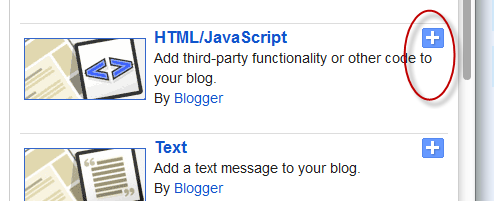
Step 2. From the pop-up window, scroll down and click on the "HTML/JavaScript" option:
Step 3. Copy and paste the below code in the HTML/JavaScript box:
Step 4. Replace http://your-blog-name.blogspot.com with your address (pay attention to not have two forward slashed at the end of it).
Other settings:
- to change the number of comments that are being displayed, replace the "5" value from a_rc=5;
- to add the date on which the comment has been made, change the "false" text from m_rc=false to "true";
- to hide the post titles, change the "true" text from n_rc=true to "false";
- to show more or less comment characters, change the "100" value from o_rc=100
Step 5. Click the "Save" button and go to see the recent comments widget for Blogger live on your blog!
The gadget is coded in JavaScript and styled with CSS but there hasn't been added too much, so that it could fit the color scheme of your Blogger template.
Parameters to be configured:
a. Number of comments - total number of comments to display;
b. Date on which the comment has been published - either display or hide it;
c. Posts on which a comment has been made - you can either hide the post titles or show them;
d. Number of words per comment excerpt - the first "n'' words of the comment will be listed.
To add the Recent Comment Widget to a Blogger blog is very easy. Just follow the next steps below:
How To Add Recent Comments Widget to Blogger
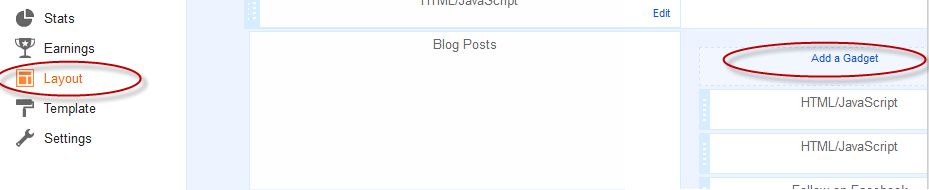
Step 1. Log in to your Blogger Dashboard, select your blog > go to "Layout" and click the "Add a Gadget" link:Step 2. From the pop-up window, scroll down and click on the "HTML/JavaScript" option:
Step 3. Copy and paste the below code in the HTML/JavaScript box:
<script type="text/javascript">
var a_rc = 5;
var m_rc = false;
var n_rc = true;
var o_rc = 100;
function showrecentcomments(e){for(var r=0;r<a_rc;r++){var t,n=e.feed.entry[r];if(r==e.feed.entry.length)break;for(var i=0;i<n.link.length;i++)if("alternate"==n.link[i].rel){t=n.link[i].href;break}t=t.replace("#","#");var a=t.split("#");a=a[0];var c=a.split("/");c=c[5],c=c.split(".html"),c=c[0];var s=c.replace(/-/g," ");s=s.link(a);var o=n.published.$t,l=(o.substring(0,4),o.substring(5,7)),u=o.substring(8,10),m=new Array;if(m[1]="Jan",m[2]="Feb",m[3]="Mar",m[4]="Apr",m[5]="May",m[6]="Jun",m[7]="Jul",m[8]="Aug",m[9]="Sep",m[10]="Oct",m[11]="Nov",m[12]="Dec","content"in n)var d=n.content.$t;else if("summary"in n)var d=n.summary.$t;else var d="";var v=/<\S[^>]*>/g;if(d=d.replace(v,""),document.write('<div class="rcw-comments">'),1==m_rc&&document.write("On "+m[parseInt(l,10)]+" "+u+" "),document.write('<span class="author-rc"><a href="'+t+'">'+n.author[0].name.$t+"</a></span> commented"),1==n_rc&&document.write(" on "+s),0==o_rc)document.write("</div>");else if(document.write(": "),d.length<o_rc)document.write("<i>“"),document.write(d),document.write("”</i></div>");else{document.write("<i>“"),d=d.substring(0,o_rc);var w=d.lastIndexOf(" ");d=d.substring(0,w),document.write(d+"…”</i></div>"),document.write("")}}}
</script><script src=http://your-blog-name.blogspot.com/feeds/comments/default?alt=json-in-script&callback=showrecentcomments></script><div style="font-size: 10px; float: right;">Get this <a href="http://helplogger.blogspot.com/2012/03/recent-comments-widget-for-blogger.html">Recent Comments Widget</a></div>
<style type="text/css">
.rcw-comments a {text-transform: capitalize;}
.rcw-comments {border-bottom: 1px dotted;padding: 7px 0;}
</style>
Step 4. Replace http://your-blog-name.blogspot.com with your address (pay attention to not have two forward slashed at the end of it).
Other settings:
- to change the number of comments that are being displayed, replace the "5" value from a_rc=5;
- to add the date on which the comment has been made, change the "false" text from m_rc=false to "true";
- to hide the post titles, change the "true" text from n_rc=true to "false";
- to show more or less comment characters, change the "100" value from o_rc=100
Step 5. Click the "Save" button and go to see the recent comments widget for Blogger live on your blog!

Cool.. may i ask you, how could i add the widget with avatars? Thanks a lot
ReplyDeleteSure, i'll make a tutorial about it. Thanks for stopping by!
ReplyDeleteIs there a way to change the a:hover color?
ReplyDeleteAdd the following line after <style type=text/css>
Delete.rcw-comments a:hover {color: color-hex-value-here;}
This is a wonderful gadget. Thank you so much for providing it! *happydance*
ReplyDeleteYou're welcome :)
DeleteSince installing your widget a few days ago (at http://skyvington.blogspot.com), I've had two cases of a spurious link introduced into posts listed by your widget. See, for example, the link attached to the word "English" in the second paragraph of the post at http://skyvington.blogspot.fr/2012/05/is-bible-good-english-literature.html
ReplyDeleteCould there be a link between your widget and these spurious links?
Hi William,
DeleteI'm sorry but i don't see where's the issue. Can you be more specific? Thanks
Please suggest how to add the post link also before the comments.
ReplyDeleteThanks very nice tool for bloggers
DeleteI tried your widget code and the simple widget in reply 4.b, and neither of them work in my blog. The site feeds are set for full. Can you help?
ReplyDeleteHi Carlos, please tell me your blog address.
DeleteSure. It is greggshorthand.blogspot.com.
DeleteAh, now i see the problem.. this widget works for public blogs only, sorry. But you can try the Last Comments widget which works on private blogs too: link
DeleteAwesome. Thanks for your help. The Last Comments widget works like a charm!
DeleteI Finally found someone who knows how to get practical advice :) Thank You
ReplyDeletethe widget appears for few seconds, then all the rest of the blog disappears and the widget stays alone in the top of the page...i'm confused :(
ReplyDeleteYou could try this widget here: Last Comments.
DeleteIt is not mine but i think it works fine :)
It worked perfectly
DeleteTHAAAAAAAAAAAAANKS admin
Not sure why, but this widget worked perfectly until the first time I published a new comment today. Meaning, it showed all my old comments that were there before I added the widget, but today when I published a new comment, they all disappeared? Help?
ReplyDeleteGreat widget! Thanks!!
ReplyDeleteperfect..thanks
ReplyDeleteThe widget will is professional and will serve some help. Keep the hard-work up. Cheers!
ReplyDeleteI used. It is working :-) Thanks.
ReplyDeleteapply it today.. simple and look cool for me.. Thanks! :D
ReplyDeleteThank you very much, it works just fine for me, great job!
ReplyDeleteIs there a way to limit the display to show only comments associated with a particular post?
ReplyDeleteThank you so much for this - I have been trying to get this to work for EVER!!!. Happy New Year.x
ReplyDeleteIs there any way of increasing the number of comments listed?
ReplyDeleteYou should change the "5" value from:
Deletevar a_rc=5;
thanks brother . . .good work
ReplyDeleteI had this on my blog and it was working perfectly until last night, when I accidentally deleted it. I added it back in but it does not seem to work. The site is www.unsoliciteddrivel.com.
ReplyDeleteAny help would be appreciated!
Maybe you forgot to change the address?
DeleteThank you, it's a helpful a nice recent comment tool.
ReplyDelete¡Muchas Gracias! Finally someone explain EASY how to make this...
ReplyDeletethanks man this widget works great
ReplyDeleteThanks so much! Worked great
ReplyDeletehttp://www.chicaffordable.blogspot.com
Great widget! Thank you.
ReplyDeleteQuestion: how can I change the number of comments?
Sorry for the late reply. Please change the "5" value from this part:
Deletevar a_rc=5;
Thanks
ReplyDeleteAwesome widgets! Keep it up..
ReplyDeleteBloggers are expecting this types of widget. Thanks.. :)
nice work, thanks for posting
ReplyDeleteThanks bro... but i have problem, my comment also appear on the list when i reply visitors comments.... can make my comment not appear...
ReplyDeleteHi mrpolie,
DeleteI will make a tutorial about it these days. Keep visiting.
Thanks bro.... i will...
Deleteyour js is not found
ReplyDeleteWhat would the class name be if I wanted to change the color of the author's name? I tried .rcw-comments-author, but it didn't work.
ReplyDeleteHi Billy,
DeleteAdd this line: .author-rc a{color: #cc0000;}
And change #cc0000 with your color.
good content about recent comments widget for blogger, I am like it that content so much
ReplyDeleteweew....thank you...i got this... :-)
ReplyDeleteThank You!
ReplyDeleteSimple and it worked for me! I was able to replace my old "Recent Comments" widget that had stopped working. Thanks so much!
ReplyDeleteHi
ReplyDeleteI have been using the widget for about 8 months or so; GREAT! I changed from the 5 comments to 35 comments. All 35 comments were showing for several months - not sure how long. Just noticed today that it is no longer showing 35 comments but now only showing 25 comments. The HTML is STILL showing it as 35 programmed, so WHY is only 25 appearing? I notice that the date I have in the script is 2012/03:
helplogger.blogspot.com/2012/03/recent-comments-widget-for-blogger.html
Does it now need to be changed to 2013?
Hi I'm writing blog using Polish fonts like "ł,ź,ę,ą" - in the names of posts the letters are omited. How can I change it?
ReplyDeleteThanks
CAN U TELL ME HOW TO USE SAME COMMENT BOX ON WEBSITE.
ReplyDeletethaks
ReplyDeletehi, can the font size be changed. I edited in html, but I do not see a change. thanks!
ReplyDeleteAdd this line just after .rcw-comments {:
Deletefont-size: 14px;
Change the "14px" value if you want a bigger/smaller font size.
Sorry for the late reply!!
you're God - that was exactly what I've been looking for for so much time! Thank you very much for your work!
ReplyDeleteYou're welcome, dear :) thanks for visiting!
Deletenice
ReplyDeletetutorial yang bermamfaat...
ReplyDeleteijin nyoba mas brooo
How do i change the color of the comment ( not the author nor post title ), the actual comment ?
ReplyDeleteJust after .rcw-comments {, add this declaration:
Deletecolor: #colorhex;
Replace color hex with the code of your color. Good luck!
Thanks for this gadget! It´s working in one of my blogs, but in another, which is only for authorized authors, I don´t know if it works, it´s not showing any comment. Is it possible because it´s not public?
ReplyDeleteThanks!!!
What kind of Widget cause a new window to open when someone attempts to leave a comment but must first prove they are human? I want to put one on my own blog but don's know what it's called or where to get it. Thanx in advance for any help here.
ReplyDeletehi d widget works fine for few days n den it stops.. can u check whts d prob?
ReplyDeleteExactly what I was looking for. Works great. Thank you!
ReplyDeleteVery nice widget. Thank you for sharing it.
ReplyDeleteThanks...it works!
ReplyDeleteThanks, great work.
ReplyDeletehttp://www.edirectsms.com
it shows Blog Spot - can i change to "My name Blog" can you help?
ReplyDeleteor i missed sth?
http://evaleefamily.blogspot.com/
I have done Step 4. Replace your-blog-name with your blog url.
ReplyDeletebut not work in my blog:http://gblog092013.blogspot.hk/
please help
Thanks!! Very cool! :)
ReplyDeleteI entered the script with my blog name as indicated. Your web page came up on the finished page. Please advise. Thanks.
ReplyDeleteI CAN'T "save" what I've tried to edit in my GADGET "TEXT". It WON'T SAVE!
ReplyDeleteWHY NOT? Please help!?
http://valeriecharoux-francais.blogspot.com/
ReplyDeleteMy recent comments widget does not show recent comments. Thanks for replying.
Any reason this should have stopped working all of a sudden? Was working fine last week. Now it's not. I don't think I changed anything in the meantime....
ReplyDeleteIts very helpful for me when i will give the comments on blog thanx
ReplyDeleteNice widget, very helpful while commenting on blogs. Thank You.
ReplyDeleteHi there! First of all, thanks for making awesome codes.
ReplyDeleteNow my question: is this code working with those blogspot users using google+ comments on their blogspot instead the default ones?
I hope so, if no, does someone know where can I find a "Recent comments" for blogspot based on google+ version for blogger?
Thank you so much ^_^
Hi, I have had this gadget in my blog for several months and it have worked totally fine I am very satisfied. But the last week it comes and goes as it wants and now for the past two days it is totally gone. I have not made any changes in the code, the design or anything else during this time.
ReplyDeleteI have tried it again with a new html window, I have tried the other reccent comments codes you have here without avatar. None of them is working. The one you have with avatar is the only one that is working fine, but I didn't want that one since it don't show which blogpost that have the posted comment.
Is there something else I can try?
By the way, your blog is awesome and I am glad that I find your site. Thank you.
thank you.. it's work :)
ReplyDeleteThis is also works perfect.
ReplyDeletebut I choose with avatar :)
Thanks for this - its good. Is there any way of getting it to list much older comments. "Recent" are OK but I'd like to show some that are 6 months old.
ReplyDeleteGreat, thanks!
ReplyDeletethanks
ReplyDeleteWhy doesn't it work on my blog?
ReplyDeleteclasse-kinzakenza.blogspot.se
Wow! Its very helpful blog regards of add widgets
ReplyDeleteHi nice widget, thanks
ReplyDeleteAnyway to exclude owner comments?
tom m.
can I delete link to this page of this gadget?
ReplyDeleteit is credit link...you may leave it or remove it....but it prefeerably u leave it to thanks the owner of the gadget
Deletethis is working great except that it's only showing one comment even when i change the number to 2, 5, 10, etc. but when i change it to 0, no comments appear. any ideas?
ReplyDeleteThank god, i found this good tutorial ;) thanks
ReplyDeletethanks but its not showing avatar
ReplyDeleteamazing post for every one....Thanks ADMIN. MY
ReplyDeletei have 2 google blogs. it works in one but not the other. if I cut and paste the working javascript into the blog where it doesnt work I can display recent comments from the other blog! If I change to the correct URL, the scripts stops working!
ReplyDeleteHi admin, seem like im having problem with this. it works when i paste your code for the first 5 comment perfectly (just like it should be). and when i post another comment it suddenly stop working. i dont know why. can you help me with this? thanks before.
ReplyDeletethanks !! its very helpful :)
ReplyDeleteI installed script on my blog www.mohanmekap.com and the css is really nice to see and add color to my blog, thanks for this great understanding of installing script.
ReplyDeleteIt's working! haha!
ReplyDeletehttp://wikiphobia.blogspot.com/
Good morning, this widget was working for a long time and now my blog only shows 2 comments at a time. Is there an update I need? Any ideas? Thanks.
ReplyDeleteWorks!
ReplyDeleteThis works, but that one with the avatars don´t. When i reloade the page, shows only the widget, and nothing from the home page. Know why?
ReplyDelete"User does not have permission to read this blog."( visit http://myblogname.blogspot.com/feeds/comments/default)
ReplyDeleteoh my god
Trying this out.
ReplyDeleteIt works! Thanks a lot - a long time that I was looking for.
ReplyDeleteThanks, work perfect :)
ReplyDeleteHello! Thank you for this, I installed it the other day and am very happy. I was just wondering, is there any way of hiding comments from the blog owner? A lot of my replies and responses are showing up on the feed and I'd rather showcase visitor comments than my own!
ReplyDeleteHi there,
DeletePlease check out this widget.